
The published deadline for migrating traditional Openreach-network phone services is 31 January 2027. If your business still relies on a PSTN line or ISDN, confirm its replacement with your provider now. A migration plan needs to cover the phone numbers, connectivity and connected equipment as well as the handsets staff use.
A small office may be able to move to a straightforward digital voice service or app-based phone system. A business with multiple sites, an existing PBX, alarms or lift phones needs a more detailed plan. Start by identifying what you have, then compare supported replacement options and the complete cost.
PSTN switch-off: the business essentials
| Issue | What your business needs to know |
|---|---|
| Published migration deadline | 31 January 2027 for the traditional services covered by Openreach’s programme; confirm your provider’s actual migration date. |
| Existing ISDN | Plan a supported IP replacement rather than assuming ISDN will remain available. |
| Replacement choices | A suitable digital voice service, hosted VoIP or compatible PBX with SIP connectivity. |
| Keeping numbers | Usually possible, subject to porting eligibility and a coordinated transfer. |
| Connected devices | Check alarms, lift phones, payment terminals, intercoms and other equipment using the old service. |
| Power and internet | Digital calling needs a resilience plan for power or connectivity failure. |
| Costs | Compare subscriptions, connectivity, devices, specialist upgrades, setup and remaining old commitments separately. |
Timetable and provider prices checked on 25 November 2026. Openreach’s current timetable gives 31 January 2027. Its business guidance describes migration planning and the consequences of not moving in time. Ask the provider named on your bill which products and dates apply to each site.
What is actually being switched off?
PSTN stands for Public Switched Telephone Network, the technology behind traditional telephone services. ISDN is an older digital telephone service often used by business phone systems. The migration moves calling to Internet Protocol, commonly described as IP, VoIP, digital voice or all-IP.
The change concerns how the service operates. It does not mean that every copper cable is physically removed on one day, that all digital services require a new full-fibre installation, or that every existing handset has to be thrown away. The available connection and compatibility of your equipment need individual checks.
Openreach’s current FAQ says other digital services can be available where full fibre is unavailable. Government migration guidance also explains that some customers may use interim arrangements. Do not treat an interim service as a business continuity plan or assume you qualify without speaking to the provider.
Stop sell and switch-off are different
The stop sell restricted new orders for older products; it did not mean every existing customer was disconnected at that point. BT Wholesale’s stop-sell announcement records the national WLR stop sell from 5 September 2023. WLR means Wholesale Line Rental.
For a business still on a legacy service, the immediate task is to establish its supported migration route and book the work. Do not wait for the final programme deadline before ordering equipment, checking specialist devices or validating numbers.
How do you know if your business is affected?
Do not rely on a handset’s appearance. A phone can look traditional while using a digital service, and an internet-connected PBX can still depend on an old external line. Use bills, provider records and a site survey together.
| Check | Information to collect |
|---|---|
| Bills and account records | Product names, numbers, provider, account references, recurring charges and contract terms. |
| Telephone equipment | PBX make, model, support status, line connections, handset types and licences. |
| Broadband | Connection type, router, service provider and any dependency on the old phone line. |
| Physical sockets and cabinets | Which devices are connected and who maintains each one. |
| Cloud and mobile services | Which calls already use apps, forwarding or hosted systems. |
| Shared buildings | Landlord-controlled lines, entry systems, communal alarms and site access requirements. |
Ask the provider to state in writing whether the current voice service is already supported beyond the migration deadline. Record the answer per site and per service. One cloud-based branch does not prove that the entire business has moved.
Audit every device using the old line
The government’s business guidance identifies equipment beyond office phones that can rely on legacy networks. Build an inventory and give every item an owner, a supplier contact and a confirmed replacement or compatibility decision. A silent line or rarely used socket is still worth investigating.
| Equipment or service | Question for its supplier |
|---|---|
| Office phones and PBX | Can the exact model, firmware and licences work with the proposed digital service? |
| Fire and intruder alarm signalling | What supported signalling path and resilience arrangement are required? |
| Lift emergency phones | Which communicator, connection and backup arrangements must be approved and tested? |
| Telecare and health-related equipment | What migration support and compatibility testing are needed for this device? |
| Card terminals and EPOS | Is the communication path already IP/mobile, or is a replacement needed? |
| Door entry and intercoms | How will calling, remote release and any associated routing operate? |
| Fax and analogue modems | Does the proposed service support the workflow, or should it move to another method? |
| CCTV and building systems | Is a telephone line used for alerts, remote access or monitoring? |
| Broadband on the old line | How will connectivity be retained or replaced when the voice service changes? |
Use the equipment manufacturer or maintenance company to approve specialist arrangements. A connector that fits, a dial tone or one successful test call does not establish that an alarm, lift or monitoring device has a supported migration solution. Our wider business phone lines guide explains the service types.
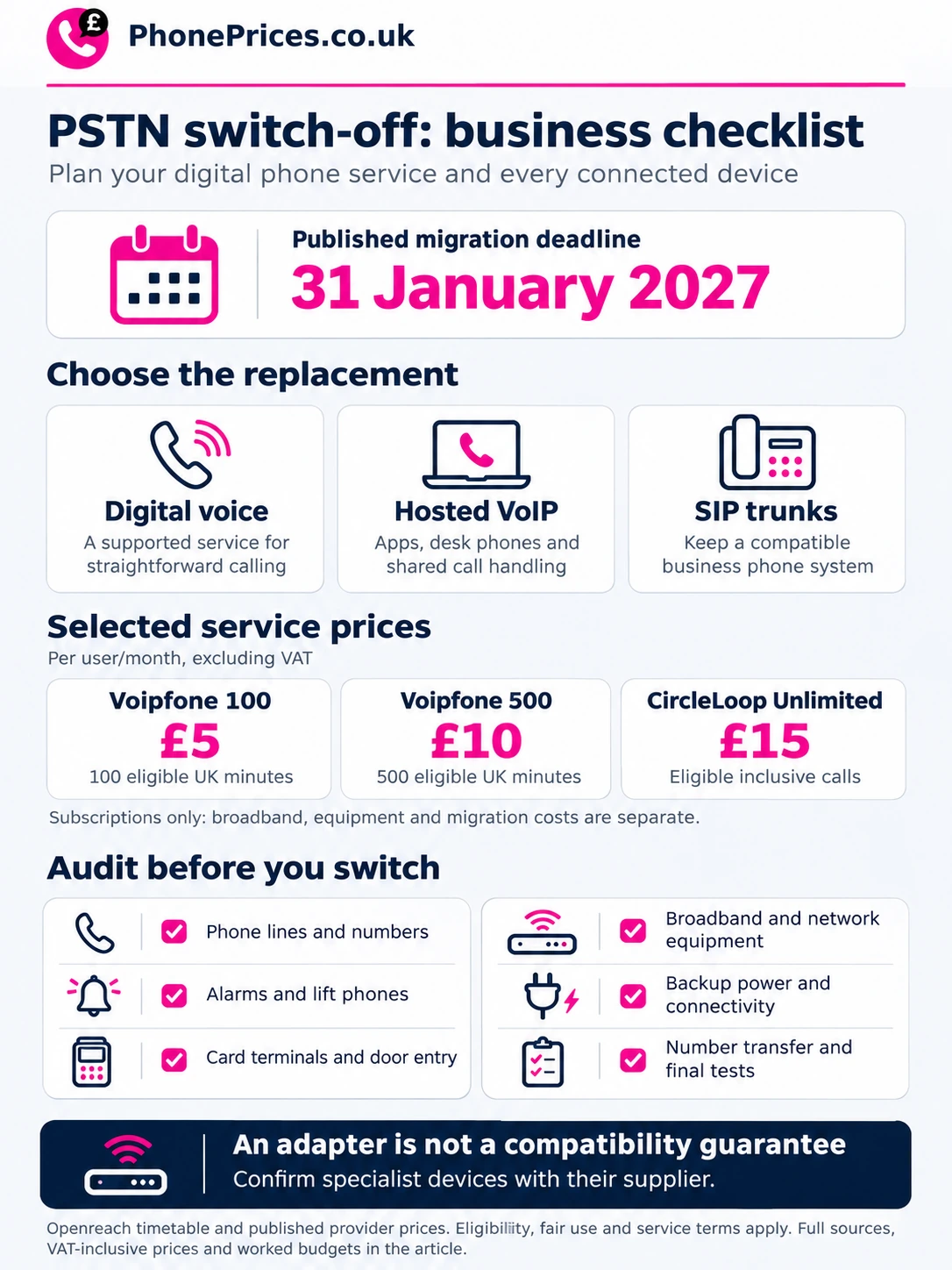
Three main replacement routes
| Route | Who should investigate it | What to include in the quote |
|---|---|---|
| Digital voice service | A business needing straightforward calling and a small number of phones. | Connection, calling plan, supported handset or adapter, installation and resilience. |
| Hosted VoIP phone system | Teams needing shared answering, apps, queues, remote users or several sites. | User licences, numbers, call allowances, devices, integrations and support. |
| Existing PBX with SIP trunks | A business with a supported, compatible phone system worth retaining. | PBX changes, channel capacity, carrier service, number migration, maintenance and fallback. |
These categories overlap: a digital voice service also uses IP calling. The useful distinction is the working arrangement your business needs and who supports it. Compare an itemised quote for that arrangement rather than a list of features with no configuration attached.
A simple digital voice replacement
This can suit a one-number office or shop that does not need a large switchboard. Ask whether the existing phone can connect through an approved router or adapter, whether extra handsets are supported and what happens when someone calls while the line is busy.
Confirm the connection and device requirements with the chosen provider. Do not assume that a consumer digital voice product, a business line and a multi-user cloud phone licence are interchangeable purchases.
A hosted business phone system
A hosted system can provide business calling through supported mobile apps, computers and desk phones. It can also centralise opening hours and shared routing. Work out the number of individual users, simultaneous callers and public numbers before comparing licences.
Specify the features staff will use: reception, call transfers, voicemail, queues, recording and any CRM links. Our small business phone system comparison and VoIP provider guide can help build a shortlist.
Keeping a compatible PBX with SIP connectivity
A SIP trunk connects a compatible phone system to an IP telephone service. It may avoid replacing a supported PBX and its handsets, but compatibility, software updates, capacity and ongoing maintenance still need assessment.
Gamma’s SIP trunking page describes this route and says installation fees typically start around £300. That is a provider’s indicative installation reference, not a complete migration quote: confirm tax, carrier charges, channels, PBX work and support for your installation.
Published replacement-service prices
There is no single compulsory “PSTN replacement tariff”. The following examples show ongoing voice-service subscriptions, not the cost of migrating a whole site. Broadband, devices, specialist equipment and project work may be additional.
| Service example | Monthly ex VAT | Monthly inc VAT | Basis |
|---|---|---|---|
| Voipfone 100 | £5/user | £6/user | 100 eligible UK minutes and one UK number per account. |
| Voipfone 500 | £10/user | £12/user | 500 eligible UK minutes; check additional numbers and optional services. |
| CircleLoop PAYG | £5/user | £6/user | One UK number; outgoing UK calls from 3p/min ex VAT. |
| CircleLoop Unlimited | £15/user | £18/user | One UK number and eligible inclusive outgoing calls. |
| Voipfone Unlimited | £20/user | £24/user | Eligible inclusive UK calling; fair-use and service restrictions apply. |
Sources: Voipfone business plans and CircleLoop pricing. VAT-inclusive figures are calculated at 20%. Verify the exact current offer and whether its devices, calling destinations and contract terms fit your business. Our flexible business VoIP guide compares commitments and cancellation.
Build the complete migration budget
| Cost category | What to ask for |
|---|---|
| Recurring voice service | Users, numbers, calling allowances and chargeable extras. |
| Connectivity | Existing connection suitability, any replacement, installation and ongoing charges. |
| End-user devices | Handsets, headsets, adapters, power supplies and compatible software. |
| Network changes | Router, firewall, cabling, switches and power requirements. |
| Specialist equipment | Alarm, lift, entry and monitoring upgrades, testing and maintenance. |
| Resilience | Backup power, alternative connectivity, mobile diversion and ongoing monitoring. |
| Project work | Configuration, installation, training, number mapping and acceptance testing. |
| Old commitments | A breakdown of valid remaining subscriptions, equipment and support liabilities. |
Separate the cost of taking numbers with you from other migration work. Ofcom’s business guidance says customers must not be directly charged for number porting. Question a proposed direct transfer charge and request a clear description of any separately priced installation or configuration.
Worked budget for a five-user office
The following is a budget illustration, not a supplier package. The subscription uses the published £10 ex VAT/user/month Voipfone 500 example. Every other amount is an explicit assumption to replace with a quotation. It assumes existing compatible phones or apps and no specialist-device work.
| Item | Assumed calculation | First-year ex-VAT cost |
|---|---|---|
| Five voice subscriptions | 5 × £10 × 12 months | £600 |
| Configuration | Assumed one-off £150 | £150 |
| Staff training | Assumed one-off £100 | £100 |
| Backup equipment | Assumed one-off £120 | £120 |
| Additional connectivity cost | Assumed £30/month × 12 | £360 |
| First-year total | £600 + £150 + £100 + £120 + £360 | £1,330 |
| First-year total including 20% VAT | £1,330 × 1.20 | £1,596 |
| Assumed ongoing monthly cost | £50 voice + £30 connectivity | £80 ex VAT; £96 inc VAT |
If the existing connection needs no additional spend, remove the assumed £360 first-year increment. If five new phones, cabling or alarm upgrades are required, add their actual quotes. Avoid presenting the £50 monthly voice subscription as the complete running cost when other paid services are needed.
Power cuts and broadband outages need different plans
Digital calling depends on powered equipment and a suitable connection. The government’s digital landline guidance explains why the power arrangement changes and why backup may be needed. A normal mobile phone can be a useful independent contact route where coverage is suitable.
| Failure | Potential measure | What still needs checking |
|---|---|---|
| Power fails at the premises | Suitable battery backup or UPS for the necessary equipment. | Router, optical network terminal, switches and phones may all need power; test usable runtime. |
| Main broadband fails | Supported backup connection or provider-level call diversion. | Capacity, signal, automatic failover and any changes to call quality or features. |
| Local mobile coverage is poor | Another supported resilience arrangement agreed with suppliers. | Do not rely on mobile diversion without testing reception. |
| Phone platform is unavailable | An agreed independent response plan. | The fallback must not depend entirely on the same failed service. |
| Specialist communicator fails | The device supplier’s approved monitoring and backup arrangements. | Office-phone resilience does not automatically protect alarms or lift equipment. |
A UPS does not fix an upstream network outage. A mobile data router does not power itself during a premises power cut. Assess both the failure you are trying to cover and the whole chain of equipment needed to keep the selected route working.
Confirm emergency-calling support and registered location information with the provider. Set the required battery runtime around business needs and supplier advice, then test it under controlled conditions. Do not assume a domestic backup product is suitable for every office or specialist device.
Keep your business numbers through the change
Collect each public number and DDI range, and ask the receiving provider to confirm the migration route before cancelling anything. Test the replacement service with temporary numbers if offered, configure the call flow and schedule the live transfer once prerequisites are ready.
Our business number-porting guide covers provider lead times, authorisation, broadband dependencies and cutover tests. A replacement system being installed does not prove that incoming calls to the advertised number have moved.
A practical migration checklist
- Appoint a business owner. Give one person responsibility for the service inventory, supplier decisions and completion evidence.
- Confirm the affected products. Ask each provider to identify legacy lines, associated services and relevant dates.
- Audit devices and locations. Record every connected device, maintaining supplier and shared-building dependency.
- Obtain compatibility decisions. Get written approval or replacement plans for phones, PBXs and specialist equipment.
- Choose the replacement. Compare the same users, calls, numbers, support and resilience across quotes.
- Order connectivity and necessary equipment. Check installation access, availability and lead times before scheduling the final move.
- Prepare the new service. Configure staff, numbers, greetings, queues, hours and fallback routes.
- Agree number migration. Validate account details, authorisation, ranges and the accepted cutover window.
- Test the full service. Include busy handling, remote users, failure arrangements and specialist-device supplier tests.
- Close and document the old arrangement. Confirm what has already ended, stop unneeded products and review the final bill.
For multiple sites, keep one register with site, supplier, numbers, device status, migration date and sign-off owner. Migrating a small pilot location first can expose configuration problems, but only where the timetable and supplier’s process allow it.
What if the deadline is approaching and work is incomplete?
Contact the service provider immediately and explain the exact products and devices still affected. Request a written plan covering what can be completed, what interim arrangements are genuinely available and which functions may be lost. Escalate unresolved dependencies to the equipment suppliers and the person responsible for the premises.
Openreach warns that businesses which have not migrated may face restricted service, an emergency voice-only arrangement known as EVAc, or loss of service. It is not a substitute for a supported business phone system, broadband or specialist monitoring. Confirm your own position rather than assuming every customer receives the same fallback.
Avoid an unsuitable contract during the migration
A necessary network change does not remove the need to compare the commercial offer. Ask for the minimum term, renewal rules, future price changes, support scope and ownership of supplied equipment. Compare a straightforward replacement with any more extensive upgrade being proposed.
Keep quoted voice charges separate from broadband, handsets, managed support and specialist work. If a supplier proposes replacing an entire PBX, ask why retention is unsupported or uneconomic. If it proposes keeping the PBX, ask who will support it after the migration.
How this guide was researched
We checked Openreach’s current programme guidance, government information and provider-owned price pages on 25 November 2026. The article focuses on planning and costs for UK businesses, with named tariff examples rather than unsupported market averages.
We have not surveyed your premises or tested the compatibility of your equipment. The five-user budget clearly separates published subscription pricing from assumed project inputs. No comparison website is used as a price source. Ask providers and device suppliers to confirm the actual requirements in writing.
Frequently asked questions
Openreach’s published migration deadline is 31 January 2027. Confirm the timetable for each service with the provider on your bill, since migrations happen before the final date and arrangements depend on the product. Businesses still using PSTN or ISDN should establish and complete a supported replacement plan.
No. The appropriate change depends on the current service and equipment. Some businesses may use a supported digital voice arrangement or retain a compatible PBX with SIP connectivity. Others may need replacement devices or a hosted system. Obtain a written compatibility assessment before buying or discarding equipment.
Full fibre can be suitable, but do not assume it is the only supported digital option. Ask your provider what is available at the address and what the proposed calling service needs. Check installation access, connectivity reliability and equipment compatibility rather than treating the cable type as the whole migration.
Usually, subject to the receiving provider confirming the number and migration route. Collect all numbers and ranges, validate the account details and agree the transfer before cancelling the old service. Test incoming calls, outgoing caller ID, routing and voicemail after the provider confirms completion.
Do not assume an adapter establishes compatibility. Ask the alarm or monitoring supplier to confirm the supported signalling path, equipment and backup requirements. Have it approve and test the arrangement before the old service ends. A working office phone or dial tone does not prove the alarm is functioning correctly.
They may stop working unless the equipment and service have appropriate backup. Identify everything that needs power, including routers, network terminals, switches and phones. Agree a resilience plan with the providers, test its runtime and keep a suitable independent way to contact emergency services.
There is no single migration price. Add voice subscriptions, connectivity, devices, network work, specialist upgrades, resilience and installation or training. The published service prices in this article are only part of that budget. Use itemised quotations and replace the worked example’s assumed inputs with your own costs.
It may meet a simple calling need where coverage and features are suitable. Check whether you must retain a public business number, share answering, handle simultaneous callers or support specialist devices. Moving staff to mobiles does not automatically replace every service attached to an old telephone line.
Your service may be restricted or lost. Openreach describes possible emergency voice-only arrangements for some circumstances, but those do not replace a full business setup or every connected device. Contact the provider urgently for your service-specific position and resolve outstanding equipment and connectivity dependencies.
Coordinate cancellation with the confirmed migration rather than ending the number service as soon as an order is placed. Check broadband and device dependencies and establish the new arrangement first. After completion, confirm what has already ended and review remaining contracts, equipment commitments and the final bill.